


Auto Backlinks Builder –
Your SEO on Autopilot
Stop manually adding links to every post. Auto Backlinks Builder automatically inserts internal and external backlinks into your WordPress and HTML site content across one site, or fifty, every single day, while you focus on growing your business.
What Is Auto Backlinks Builder?
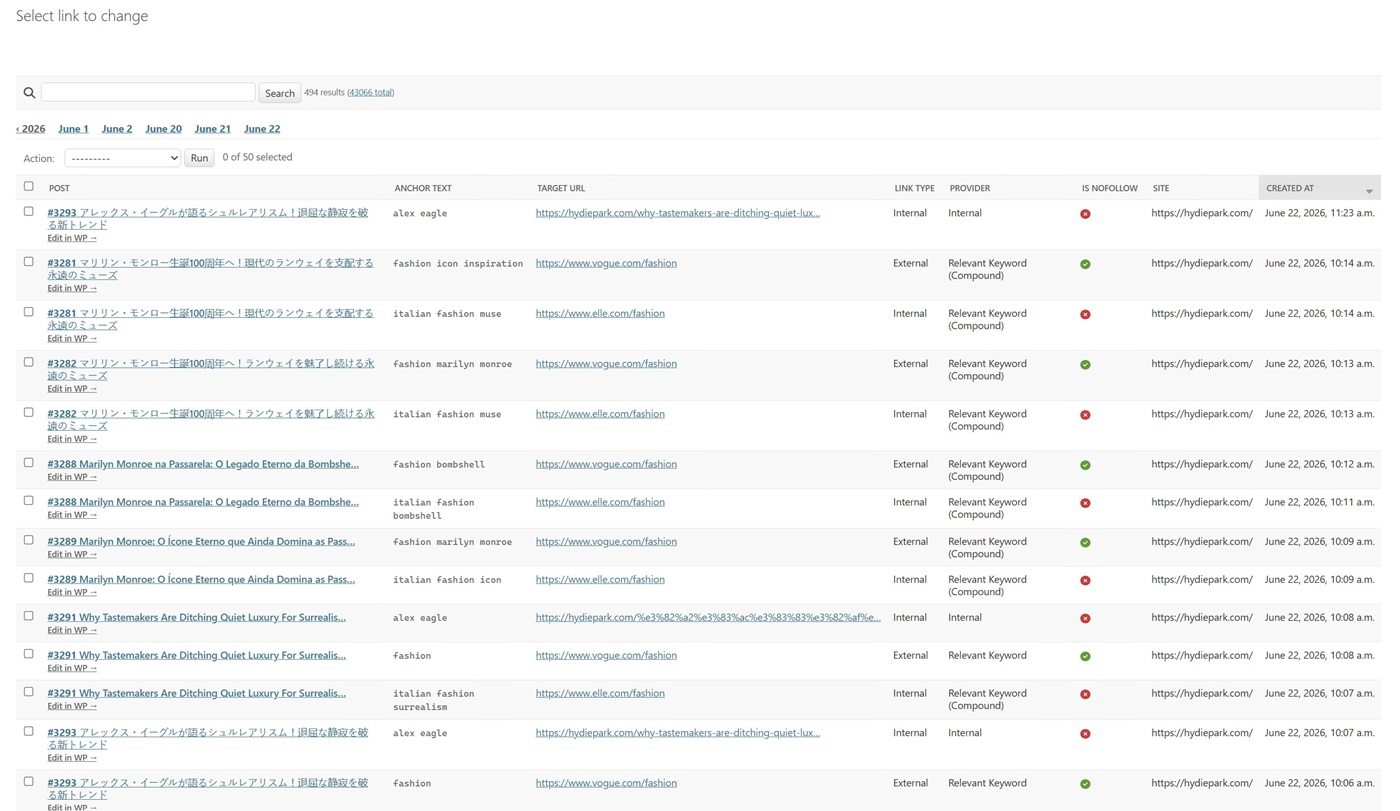
Auto Backlinks Builder (ALB) is a SaaS tool that connects to your WordPress or HTML website and automatically inserts hyperlinks into your existing posts. You define your relevant keywords, and the URLs they should link to, and ALB does the rest, scanning your content on a schedule and adding links wherever those keywords appear.
Whether you want to strengthen your internal site structure, point readers to affiliate offers, or build cross-site link networks, ALB handles it automatically — no plugins to maintain, no manual editing, no developer needed.
💡 The core idea is simple: every time your relevant keyword appears in a post, ALB replaces it with a clickable link — to any URL you choose. Set it once, and it runs forever.
Key Features
- Automatic backlink insertion based on your relevant keywords and target URLs
- Internal links (page to page on your site) and external links (to any URL)
- Unlimited relevant keywords per site
- Import keywords and target URLs from Google Sheets or CSV – bulk setup in seconds
- Control how many links are inserted per post and per scan
- Category filtering – target only specific post categories
- Scheduled automatic scanning – hourly, twice daily, or daily
- Manages multiple WordPress and HTML sites from one control panel
- Publish Destinations – push links to secondary WordPress or HTML sites automatically
- Per-destination category picker – assign links to the correct category on each destination
- Full scan history and link reports per site
- Safe and non-destructive – original content is never permanently overwritten
- n8n and Make (Integromat) integration via API
- 500 free token bonus – 25 on sign-up, 475 after the 7-day refund window
See It In Action
Managing Multiple Websites
ALB is built for people who run more than one website. Add as many WordPress and HTML sites as your plan allows, each with its own relevant keywords, link targets, scan frequency, and category filters. One dashboard gives you a complete view of all your sites, how many links have been inserted, when the last scan ran, and what’s queued next.
For agencies and SEO professionals managing client sites, ALB removes the most time-consuming part of the job – manually linking between posts, and turns it into a fully automated background process.
🏠 Single Site Owner
Set up keyword rules once for your niche site. ALB scans every new and existing post automatically, building a strong internal link structure that Google rewards with better rankings.
🏢 Agency / 50+ Sites
Manage entire client portfolios from one login. Each site runs independently on its own schedule. The cost per link across 50 sites is a fraction of what a VA would charge for the same work.
🛒 Affiliate Marketers
Map your product keywords to your affiliate URLs once. Every post from the past, present, and future will get the right link automatically, without touching a single article manually.
✈️ Travel & Niche Bloggers
Link destination names, product mentions, and topic keywords to your best content automatically. Build authority internally while pointing readers to your most valuable pages.
n8n & Make Automation
ALB integrates with n8n and Make (Integromat) via its API. This means you can:
- Trigger a scan automatically whenever a new post is published on your site
- Chain ALB with ACA, and ACA publishes a post, then ALB immediately scans it and inserts links
- Receive Slack or email notifications when a scan completes
- Push relevant keyword lists from Google Sheets directly into ALB via automation
- Build full multi-site workflows: publish post → add images → insert links, all without code
💰 Cost Per Link – Real Numbers
A freelancer charges $3–$10 per manually inserted link. With ALB the cost is a fraction of that, and it never sleeps.
1-site plan: 1 link = $0.076 + AI provider cost
50-site plan: 1 link = $0.0498 + AI provider cost
Every new account receives 500 free link tokens, 25 on sign-up and 475 more after the 7-day refund window.
Initial Setup – Under 5 Minutes
- Create your account – sign up at autobacklinksbuilder.com using the button in your WP plugin
- Add your WordPress or HTML site – enter your site URL and connection credentials
- Test the connection – one click confirms your credentials are working
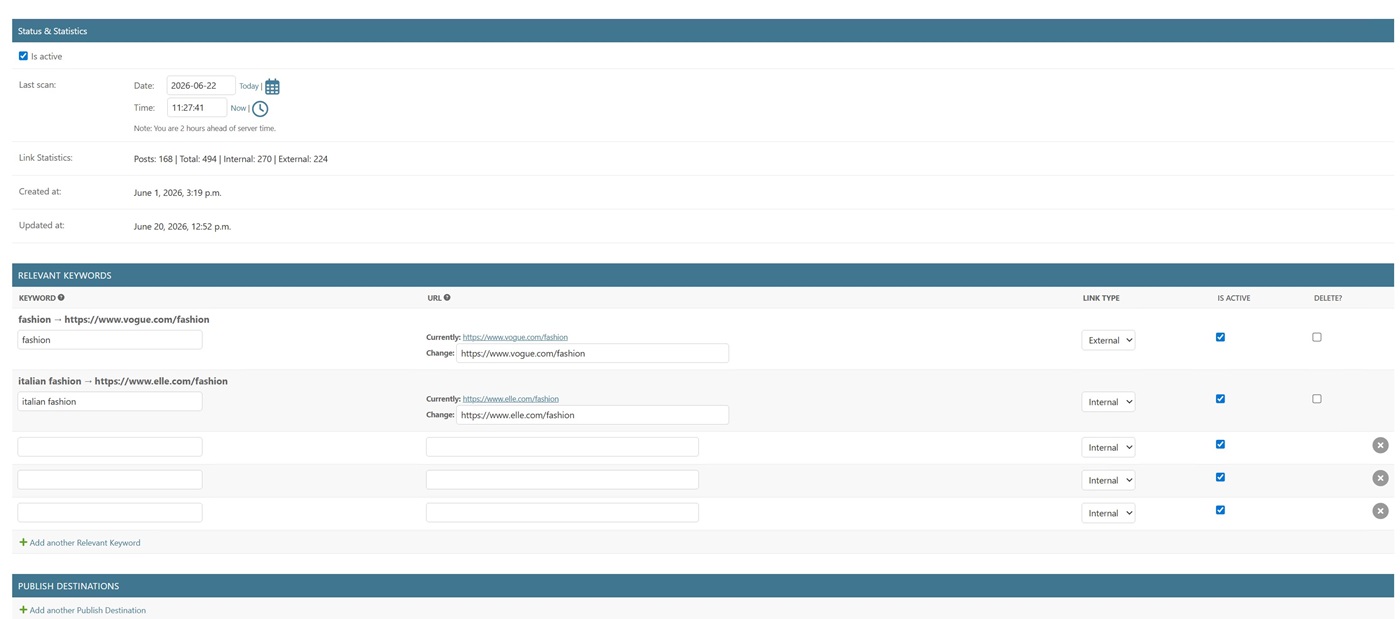
- Add your relevant keywords – enter a keyword and the URL it should link to, or import in bulk from Google Sheets or CSV
- Run your first scan – click Generate Now and watch links appear across your posts
- Set your schedule – choose hourly, twice daily, or daily for automatic future scans
No technical knowledge required. If you can use WordPress, you can use ALB.
Who Is ALB For?
- WordPress and HTML site owners who want better internal linking without manual work
- Affiliate marketers who need keyword-to-offer links across hundreds of posts
- SEO agencies managing multiple client websites
- Niche site builders scaling to large content portfolios
- Travel bloggers linking destination names and local business mentions automatically
- Anyone who has spent hours manually adding links to old posts
🔥 Get the Full 3-Tool Bundle – Lifetime Deal
ALB is part of the AI Tools Integration Suite, 3 SaaS tools (ACA + ALB + AIPIG) managed from one control panel. One lifetime payment, no subscription.
One-time payment · No subscription · All 3 tools included · Up to 500 free bonus tokens on activation
▶ Watch: How to Set Up Auto Backlinks Builder
Want the complete walkthrough for all 3 tools? Watch the full 23-minute AI Tools Integration Suite setup video →
Affiliate Programme — 30% Commission
Earn 30% commission on every sale you refer. Whether you have a blog, YouTube channel, or SEO community, our affiliate programme turns your recommendations into consistent income. Apply at Gumroad Affiliate Program →
❓ FAQ Section
What is Auto Backlinks Builder?
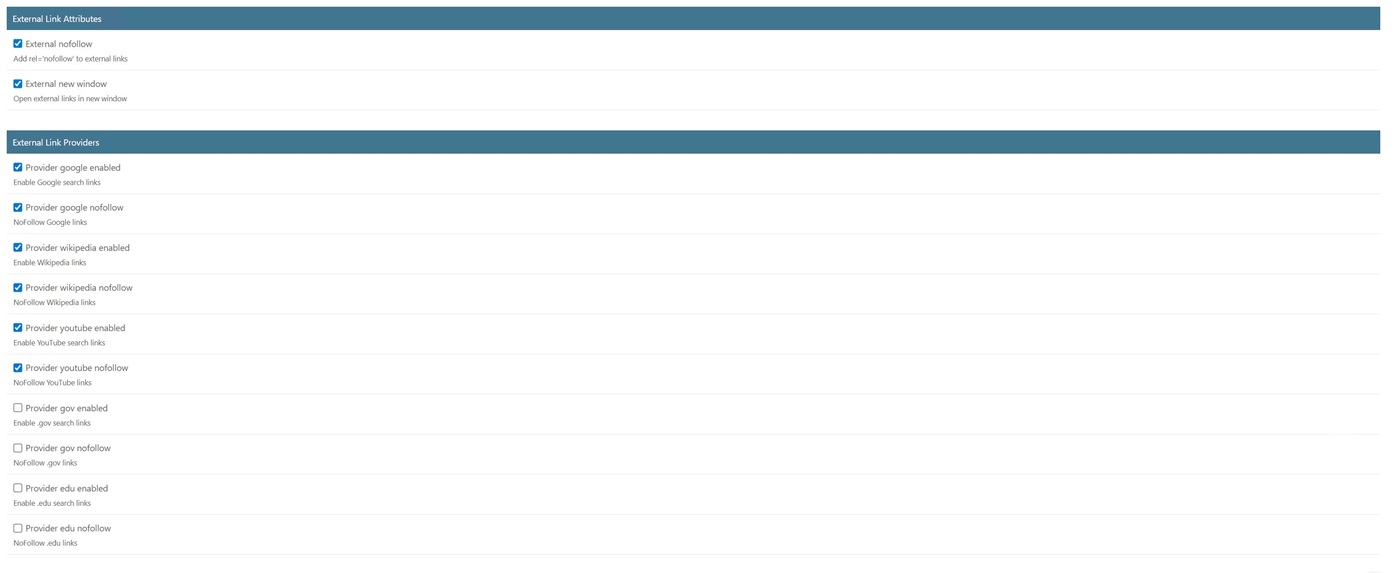
Auto Backlinks Builder is a cloud SaaS platform that automatically scans your WordPress posts and inserts relevant internal and external links using your existing WordPress posts with relevant keywords. Unlike traditional WordPress plugins, all processing runs on dedicated cloud servers, meaning zero cron jobs and zero impact on your hosting performance. The platform supports internal links between your own posts, as well as external links to authoritative sources, including Google, Wikipedia, YouTube, and high-authority .gov and .edu websites.
How is the SaaS version different from our old WordPress plugin?
The original WordPress plugin (versions up to 4.3.6.2) ran entirely on your WordPress hosting server via cron jobs, which caused performance issues and timeouts in shared hosting environments. Version 5.0 is a complete rebuild with all scanning and link processing now running on dedicated Auto Backlinks Builder cloud servers. Your WordPress site only receives the final updated post content via the REST API, keeping your site fast and stable regardless of scan size or frequency.
How does the token system work?
The token system is simple: 1 token equals 1 link inserted. A standard scan inserts 2 internal links and 2 external links, using 4 tokens per post. Every new user receives 500 free welcome tokens to get started. 50 tokens are credited immediately when you first connect your URL site, with an additional 450 tokens automatically added after a 3-day free trial period. Additional tokens can be purchased at any time from your dashboard. All token transactions are recorded in a full ledger, so you always know exactly how your tokens are being used.
What token packages are available?
Auto Backlinks Builder offers four flexible token packages to suit any budget and site size:
250 tokens – $19
500 tokens – $29
1,000 tokens – $59
5,000 tokens – $249
There are no monthly subscriptions; you only pay for the links actually inserted. Tokens never expire and can be used across all your connected WordPress sites from one account.
Will Auto Backlinks Builder slow down my website?
No. This is one of the biggest advantages of the SaaS platform over the old plugin version. All scanning, link matching, and content processing run entirely on Auto Backlinks Builder cloud servers. Your WordPress site receives only the finished, updated post content via the REST API. There are no cron jobs running on your server, no background processes consuming your hosting resources, and no risk of timeout errors during large scans.
What are Relevant Keywords, and how do I use them?
Relevant Keyword lets you define custom keyword-to-URL mappings that always take the highest priority during scanning. For example, you can set the phrase “AI automation” to always link to a specific page or external URL whenever it appears in your content. You can create relevant keyword rules manually in your dashboard, import them in bulk via CSV from Google Sheets or Excel, or automate them entirely using Make, n8n, or Zapier integrations through the REST API.
Can I manage multiple WordPress sites from one account?
Yes. Auto Backlinks Builder includes a multi-site dashboard that lets you manage all your connected WordPress websites from a single account. Each site has its own settings, relevant keyword rules, scan schedule, link-density controls, and token-usage tracking. This makes Auto Backlinks Builder ideal for SEO agencies, freelancers, and anyone managing multiple WordPress content sites.
Is Auto Backlinks Builder compatible with Yoast SEO and RankMath?
Yes. Auto Backlinks Builder updates post content via the WordPress REST API and does not interfere with SEO metadata, schema markup, or any settings managed by Yoast SEO, RankMath, or other SEO plugins. It works alongside all major WordPress SEO plugins without conflicts, and plugin updates are delivered automatically through the licensing system once your license is active.